Everstamp Review: Tamper-Evident Photo Documentation and Timestamps
We have tested Everstamp (everstamp.app), a mobile timestamp camera app that uses hardware-backed cryptographic signing and eIDAS qualified seals to create verifiable photo documentation.

Welcome to this Everstamp review 😊!
If you work in construction, property management, vehicle rentals, or field services, you already know the biggest bottleneck in photographic documentation. Standard smartphone photos lack legal weight when disputes happen. Timestamps and GPS coordinates stored in basic EXIF metadata can be edited in seconds using free desktop apps or online converters. When a client argues about work hidden behind drywall, a tenant disputes damage at move-out, or a driver contests pre-existing vehicle scratches, regular camera photos frequently fail to resolve the argument. I have been testing Everstamp and it is one of the more practical, tamper-evident photo verification tools available for capturing trustworthy visual records.
The mobile camera space is crowded with lightweight timestamp apps that merely stamp decorative text over photos. What makes the Everstamp platform different is that it treats photographic captures as cryptographic evidence. Developed in the Netherlands by Digital Sandbox B.V., Everstamp ties every image and video to the hardware security chip inside your smartphone, anchors sequences using open standards, and seals completed dossiers through an independent, qualified trust service on the European Union trust list.
Let's dig in.
Getting Started with Everstamp
First thing you notice on Everstamp is how easily you can begin without administrative friction. You do not even need to create an account or provide an email address to take your first photos.
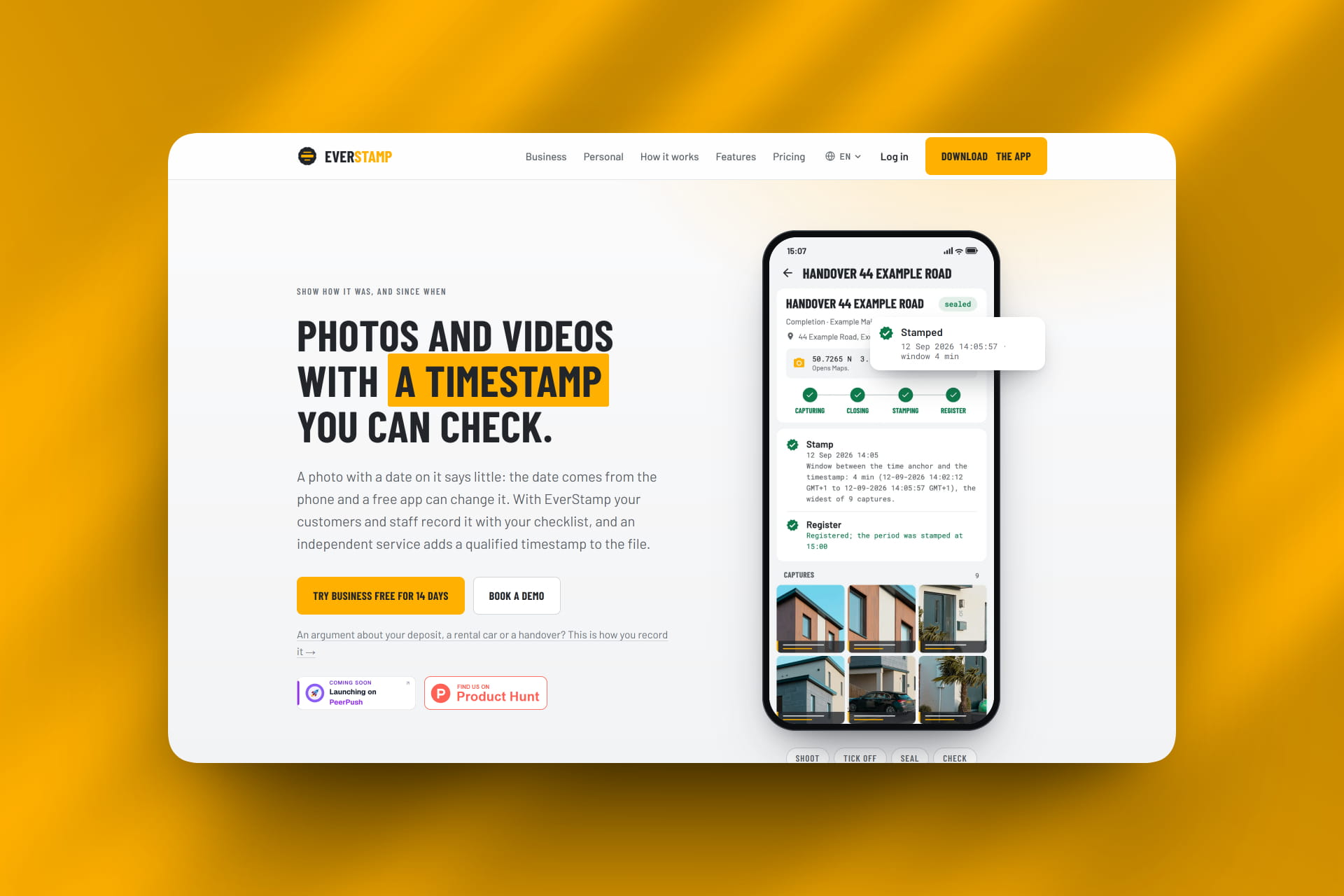
The platform gets straight to the point. The mobile app runs on iPhone (iOS 18 or newer with Secure Enclave) and modern Android devices (Android 12 or newer with hardware-backed Keystore or StrongBox). When you install the app, it creates an asymmetric cryptographic key inside the hardware security enclave of your phone. That private key never leaves the chip, preventing any spoofing of the device identity.
Getting started on the Basis tier is completely free. Your first dossier is sealed with the exact same legal-grade certificate as on paid tiers, allowing you to test the complete capture and verification workflow on real job sites before spending a cent.
How It Works: Cryptographic Sealing and Open Verification
In most photo documentation apps, files are uploaded to proprietary corporate servers where only subscribers can view them. Everstamp reverses that paradigm by prioritizing local privacy and open standards.
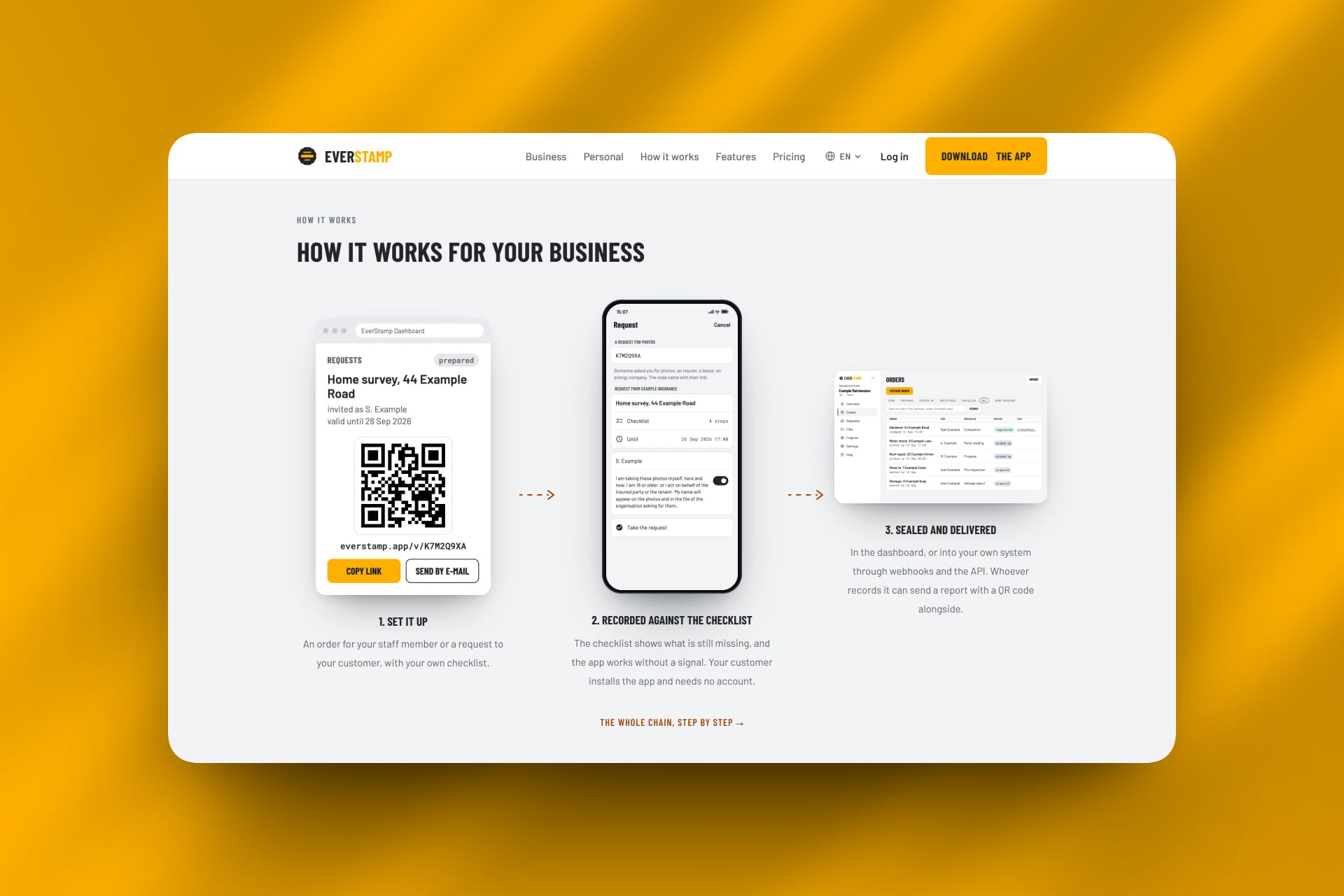
What stands out is the chained capture process. When you start an inspection dossier, every photo receives an indelible stamp bar across the bottom displaying the device clock, street address, file name, and your name or company. In the background, the app cryptographically signs each photo with your hardware key, linking each image to the previous capture in a sequential chain.
Once your dossier is closed, Everstamp sends a cryptographic hash of the collection to a qualified trust service under Article 41 of the European eIDAS regulation. The independent trust service applies an official RFC 3161 timestamp and digital seal. Anyone can verify the authenticity of the file for free in an ordinary browser at the verification portal without needing an account or third-party software.
The Inspection Workflow Experience
This is where Everstamp demonstrates its utility for field technicians and inspectors.


You can easily use pre-built templates for common jobs like move-in handovers, snag lists, or plumbing that gets covered by plasterboard. If a checklist calls for a meter reading, the camera recognizes the numbers directly in the viewfinder through on-device OCR. Clients can even sign the report directly on your phone screen before you seal the file.
Key Features Worth Knowing
Hardware-Backed Cryptographic Signing
Keys are generated and stored exclusively within your device Secure Enclave or StrongBox chip, making it impossible to forge the capture device or tamper with photos retroactively.
Independent eIDAS Qualified Timestamp
Completed dossiers are sealed by an independent European trust service, establishing indisputable proof that the photos existed in their exact state at that specific moment.
Account-Free Browser Verification
Recipients can verify dossiers, individual photos, and PDF reports at everstamp.app/verify using standard web browsers, with compatibility backed by open C2PA content credentials.
Local Device Storage & Privacy
Captures remain safely stored on your phone hardware rather than in third-party clouds, unless you explicitly create an encrypted share link or submit files at an organization's request.
Business API & Webhooks
The business dashboard lets organizations dispatch job requests to field crews or subcontractors, receiving completed dossiers directly into back-office software via webhooks and REST endpoints.
Flexible Access and Pricing
Instead of forcing solo tradespeople into expensive monthly contracts, Everstamp provides flexible purchasing models tailored to individual or enterprise demands.
- Solo Contractors & Tradespeople : can use the Basis plan with zero subscription fees, receiving a free first dossier and purchasing individual file credits only when required.
- Property Managers & Inspectors : can utilize the Plus plan for 10 files per month, custom logo branding on PDF reports, on-site client signatures, and automated cloud backups.
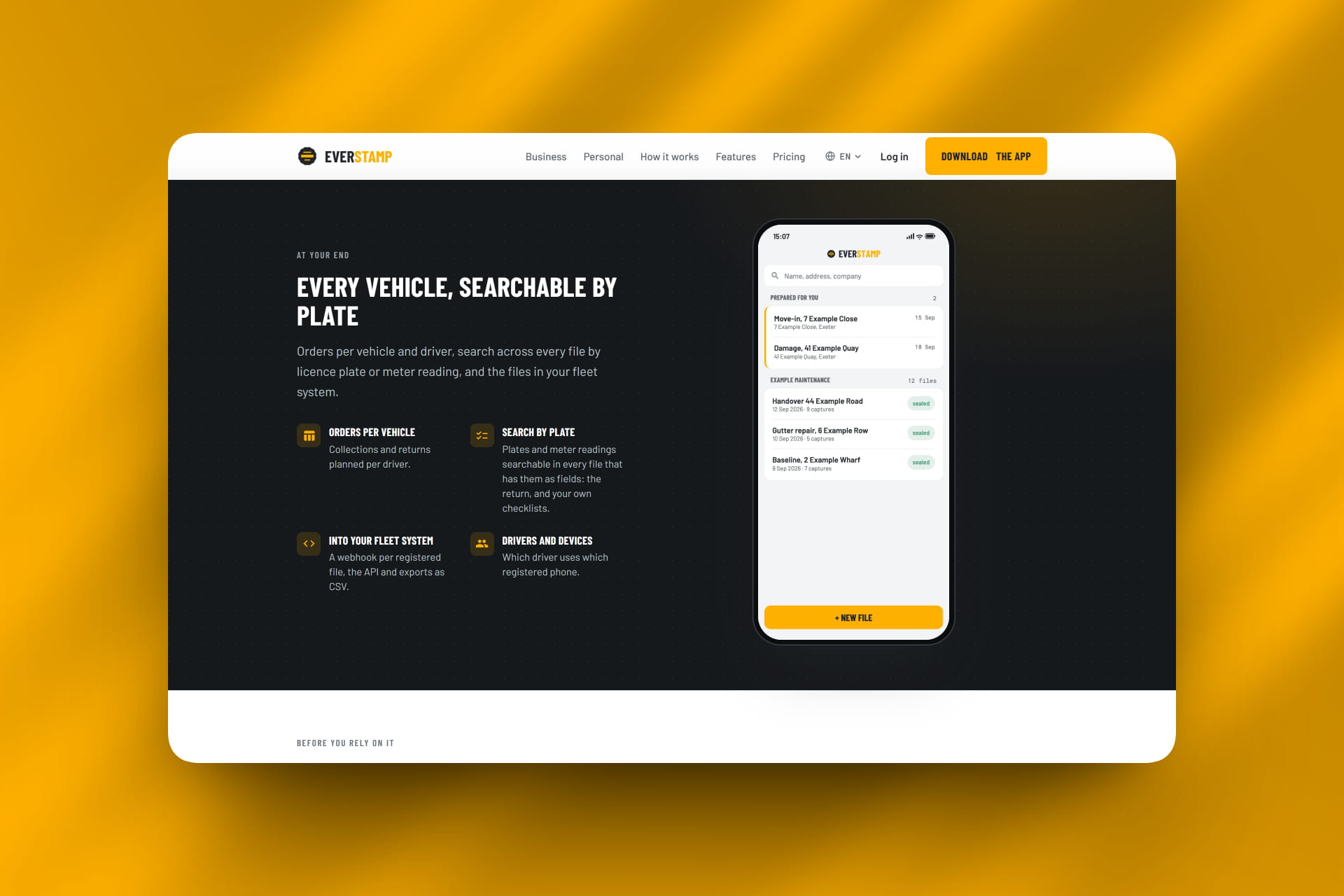
- Fleet Operators & General Contractors : can deploy the Business tier to manage crew checklists from a central dashboard, assign work to subcontractors without extra user accounts, and sync data via API.
Because credits purchased on the Basis tier never expire, you only pay for the documentation you actually use.
Who Is Everstamp For?
- Contractors and installers needing indisputable records of hidden work before closing walls
- Property managers and landlords documenting property conditions during tenant transitions
- Car rental and fleet teams logging vehicle scratches, fuel gauges, and odometer readings
- Insurance claim adjusters requiring tamper-evident visual proof for underwriting and incident reviews
- Field service crews looking for structured checklists that sync into back-office systems
- Anyone looking for a reliable, cryptographic timestamp camera app
Accessibility: Standard Smartphone Photos vs. Everstamp Dossiers
| Feature | Standard Camera Photos | Everstamp Platform |
|---|---|---|
| Tamper Resistance | Easily manipulated via EXIF editing tools | Cryptographically signed via hardware security chips |
| Legal Timestamp | Relies on easily alterable device system clocks | Certified by independent eIDAS qualified trust service |
| Verification Method | None, requires trusting the sender | Free web browser verification via open standards |
| Data Privacy | Automatically uploaded to commercial clouds | Kept locally on device storage by default |
| Field Guidance | Random photo rolls with missing angles | Structured checklists with on-device OCR recognition |
Everstamp Review: The Verdict
✅ What I liked:
- Generates cryptographically verifiable evidence rather than cosmetic watermarks
- Hardware signing utilizes the device Secure Enclave and StrongBox chips
- Free browser verification requires zero accounts or proprietary software
- Basis tier operates on a pay-as-you-go model with no monthly subscription traps
- Photos remain stored locally on your device for complete privacy
- Pre-built checklists ensure field crews never miss critical angles
Overall, Everstamp delivers an outstanding solution to the trust problem in digital photography. As AI image generation and digital editing tools become more ubiquitous, unverified photos will carry less and less credibility in formal disputes. Everstamp provides a reliable, open standard for proving exactly what was photographed, where it was taken, and when the file was sealed.
If your business relies on visual evidence to substantiate invoices, resolve disputes, or document field work, Everstamp is well worth implementing.
Latest News: Everstamp Platform Launch
To see how digital verification is advancing, look at Everstamp's integration of the C2PA open standard alongside eIDAS qualified trust sealing. The platform recently expanded its dashboard functionality with real-time webhooks, allowing construction and property management firms to pipe cryptographically sealed field dossiers directly into systems like Zapier, Make, and internal ERP platforms.
FAQ
What is Everstamp?
It is a mobile timestamp camera and documentation app for iOS and Android that cryptographically signs photos and seals files with an independent, legally recognized European trust service.
How is Everstamp different from other timestamp camera apps?
Basic timestamp apps only paint text onto the image, which can easily be spoofed or created with photo editors. Everstamp signs every capture using your smartphone's hardware security chip and seals the entire dossier with an eIDAS-qualified trust service.
Does someone need an Everstamp account to check my photos?
No. Anyone can inspect an Everstamp dossier, PDF report, or image archive by visiting everstamp.app/verify in any standard web browser without logging in.
Do my photos get stored on Everstamp servers?
No. Your captures remain stored directly on your phone storage. Files are only transmitted to Everstamp servers if you generate an encrypted share link or submit photos requested by an organization.